Showing Posts From
Youtube spam policy
 CreatorPlaybook Team
- 07 Nov, 2026
YouTube Spam-Termination Cleanup: The New 30-Day Grace Period to Save Your Channel (Announced 29 Oct 2026)
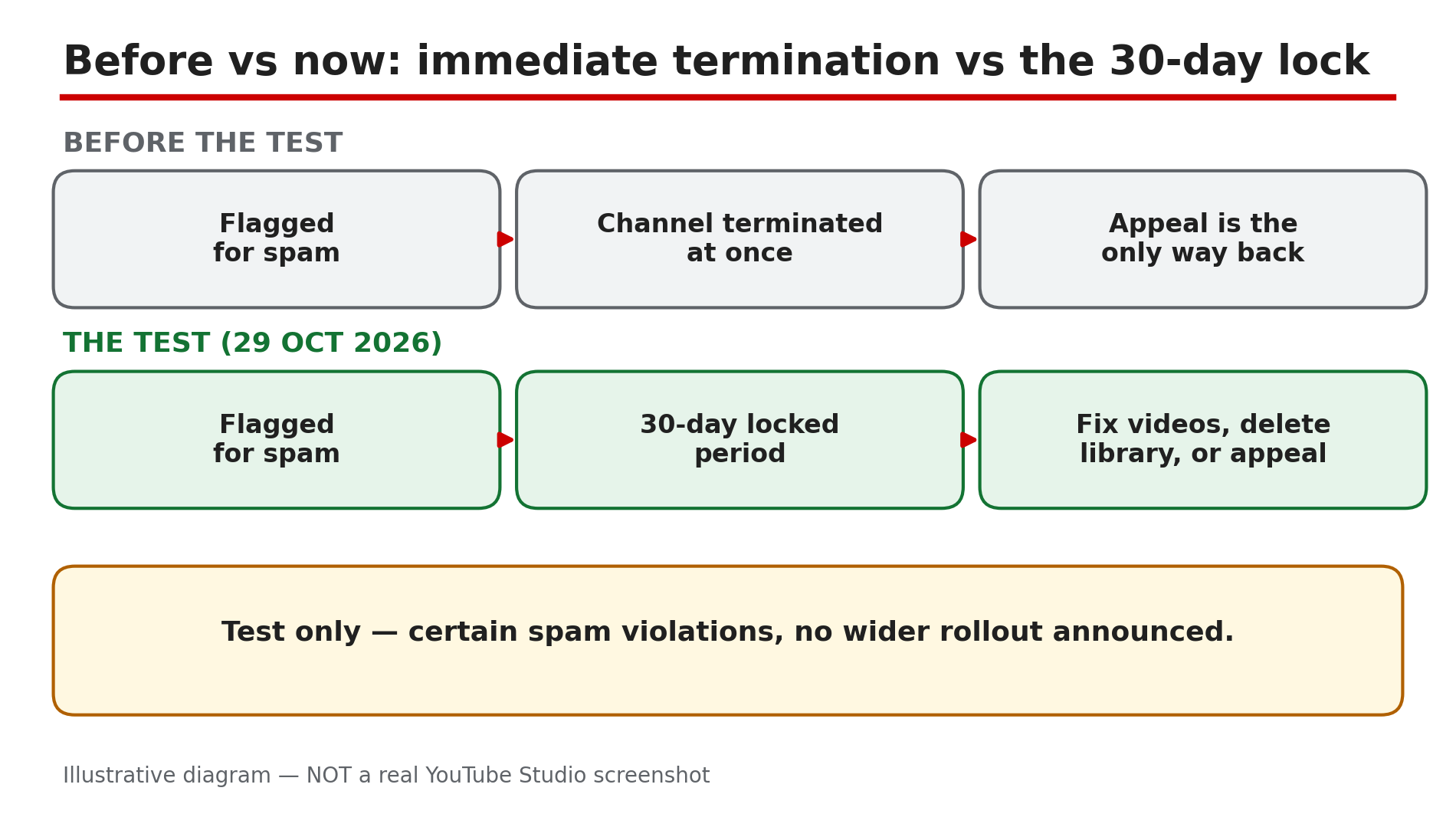
Until now, a channel that crossed YouTube's spam-termination line had almost nothing left to do: the channel was removed, and the only way back was an appeal — win it, or start again from zero. On 29 October 2026, TeamYouTube announced a test that changes that. As reported by Dexerto and Social Media Today, eligible channels facing immediate termination over certain spam-policy violations will instead enter a 30-day locked period, with three ways out: fix the flagged videos, delete the whole video library, or appeal. This is a test, not a new rule for everyone: as checked on 7 November 2026, no wider rollout has been announced, and the test covers certain spam violations only. This guide explains the three routes, and how to choose before the deadline runs out. What You Will LearnWhat the 30-day cleanup test is, and who it covers How to find the notice and the exact deadline What stays locked during the 30 days The three routes out: fix videos, delete the library, or appeal What happens if a cleanup review is rejected What doing nothing costsStep 1 — Understand what changed: termination is paused, not cancelled What to do: Learn the new sequence before you act, so you do not mistake a 30-day window for a pardon. How: Before this test, a channel facing immediate termination over spam was removed at once, and the appeal was the only route back. Under the test, as reported by Dexerto, an eligible channel enters a 30-day locked period. YouTube says the owner "will be notified via email and in YouTube Studio on desktop," as quoted by Social Media Today. Announced on 29 October 2026 by TeamYouTube; no wider rollout has been announced. Example: A channel with 40,000 subscribers is flagged for spam and would previously have vanished overnight. Under the test, the owner gets 30 locked days to clean up. Common mistake: Telling others "YouTube now gives everyone 30 days before termination." It does not — the test covers certain spam-policy violations only, and YouTube has not said which ones qualify.Illustrative diagram: the test replaces immediate termination with a 30-day locked period for eligible channels. Step 2 — Find the notice and mark the exact deadline What to do: Find the official notice, confirm your channel is in the test, and write down the exact day the window closes. How: As reported, YouTube notifies eligible owners by email and in YouTube Studio on desktop. Check the inbox of the Google Account that owns the channel, including spam, then open YouTube Studio — the notice is there, not only on a phone. Confirm the deadline in your own Studio and email, not a forwarded screenshot. The 30 days run from YouTube's notice, not from the day you read it. Example: A creator finds the email three days after it arrived, then opens Studio and sees the remaining days. She writes the closing date on a wall calendar and sets a reminder a week before it. Common mistake: Assuming the 30 days start when you open the email. They do not — the window starts when YouTube locks the channel, so days may already be gone.Illustrative diagram: the 30-day locked period, what is blocked during it, and the day 30 deadline. Step 3 — Know what is locked: no uploads, no comments What to do: Accept the limits of the locked period, and plan your cleanup inside them instead of fighting them. How: While the channel is locked, certain actions are not available. As reported, owners cannot upload new videos or post comments during the 30-day period. That is a hard limit — the restriction applies to the channel, so switching to a manager's login will not lift it. Nothing in the announcement, as reported, says existing videos stop being watchable. Example: A gaming creator in the locked period wants to post a community update, but comments and uploads are blocked. She does the cleanup first and plans the update for after the unlock. Common mistake: Creating a second channel to keep uploading while the first is locked. That does not save the first channel — a new channel to get around a termination is itself against the rules.Illustrative diagram: the three reported routes out of the 30-day locked period. Step 4 — Route 1: fix the flagged videos, then pass YouTube's review What to do: Review the flagged videos one by one, and edit or delete the ones that break the spam policy. How: As reported, use YouTube Studio tools, including the video editor, to edit or delete violating videos. Check the flagged videos, then the rest of the channel, against the nine spam categories on the official Spam policy page — our deep-dive covers all nine. This route does not unlock the channel by itself: as reported, the cleanup must pass YouTube's review before the channel is unlocked. Example: A creator finds six flagged videos: four near-identical AI-scripted uploads, and two with misleading thumbnails. She deletes the four, fixes the two thumbnails, and submits the cleanup for review. Common mistake: Editing one video and assuming the channel unlocks at once. Cleanup only works after YouTube's review approves it — confirm in Studio if your submission is still under review.Illustrative mock-up: how the individual-video cleanup route works, ending in a YouTube review. Step 5 — Route 2: delete the whole video library and unlock immediately What to do: Weigh a fresh start against the videos you would keep, and choose this route only with your eyes open. How: As reported, deleting every video unlocks the channel immediately — no review wait. The channel keeps its subscribers, handle, and YouTube Partner Programme (YPP) status — an audience, but zero videos. The cost is heavy: every video goes too. This route fits a library that is mostly the problem, not one with only two or three flagged videos. Example: A channel with 300 uploads finds 280 are the same re-uploaded clips, sped up. The owner deletes the whole library, keeps 12,000 subscribers and the handle, and starts again with original videos. Common mistake: Deleting the whole library in a panic on day one, before checking whether fixing a few videos could have saved the rest. The delete is instant and irreversible — try Route 1 first.Illustrative diagram: deleting the whole library unlocks the channel at once but removes every video for good. Step 6 — Route 3: appeal if flagged wrongly — and what to do if review rejects you What to do: Appeal only if the channel genuinely complies, and keep the fallback in mind if your cleanup is rejected. How: As reported, if the channel was flagged incorrectly, you can appeal. Our deep-dive covers the short, factual appeal: state the policy, explain what happened, and point to proof the content is original. A rejected cleanup is not the end: as reported, you can still delete all your videos inside the 30-day window. A failed Route 1 leaves Route 2 open while days remain — act early. Example: A creator whose videos are original commentary appeals: the flagged uploads are her own analysis. Her appeal is rejected, but with 12 days left she deletes the flagged videos, and the channel is unlocked. Common mistake: Appealing when the content clearly violates the policy, or filing on day 29 — a weak appeal wastes the window, and a late one leaves no time to switch routes.Illustrative diagram: what to do if a cleanup review is rejected, and what happens if nothing is done in 30 days. Checklist — Your Channel Is in the 30-Day Spam Cleanup Window☐ I found the notice in email and in Studio on desktop ☐ I wrote down the exact closing date ☐ I know uploads and comments are blocked while locked ☐ I checked the flagged videos against the nine spam categories ☐ I chose one route: fix videos, delete the whole library, or appeal ☐ If I fixed videos, I submitted the cleanup for review ☐ If review was rejected, I still have days left for the full-library delete ☐ I did not create a second channel to work around the lockFAQs 1. Does every terminated channel now get 30 days to fix the problem? No. As reported, this is a test announced on 29 October 2026, limited to eligible channels facing immediate termination over certain spam-policy violations. No wider rollout has been announced. 2. Can I upload new videos or post comments during the 30 days? No. As reported, uploading new videos and posting comments are not available while the channel is locked. 3. If I delete my whole video library, do I lose my subscribers and monetisation? As reported, no. Deleting every video unlocks the channel immediately, and it keeps its subscribers, handle, and YouTube Partner Programme status. The videos are gone for good. 4. What happens if YouTube rejects my manual cleanup? As reported, you can still delete all your videos while inside the original 30-day window. Submit cleanups early enough to leave days for the fallback. 5. What happens if I do nothing for 30 days? As reported by YouTube, failing to address the issues within 30 days, or taking no action, leads to channel termination — permanent once the window closes. SourcesYouTube Help — "Spam policy" (official page, opened live 7 Nov 2026): https://support.google.com/youtube/answer/2801973 CreatorPlaybook — "YouTube Spam Termination Explained: Why Channels Get Removed and How to Appeal" (internal link, verified live 7 Nov 2026): </blog/youtube-spam-termination-explained-why> CreatorPlaybook — "YouTube Temporary Feature Pause for Hacked Accounts: What It Means and How Long It Lasts" (internal link, verified live 7 Nov 2026): </blog/youtube-temporary-feature-pause-for>
- CreatorPlaybook Team
- 05 Nov, 2026
YouTube Spam Termination Explained: Why Channels Get Removed and How to Appeal
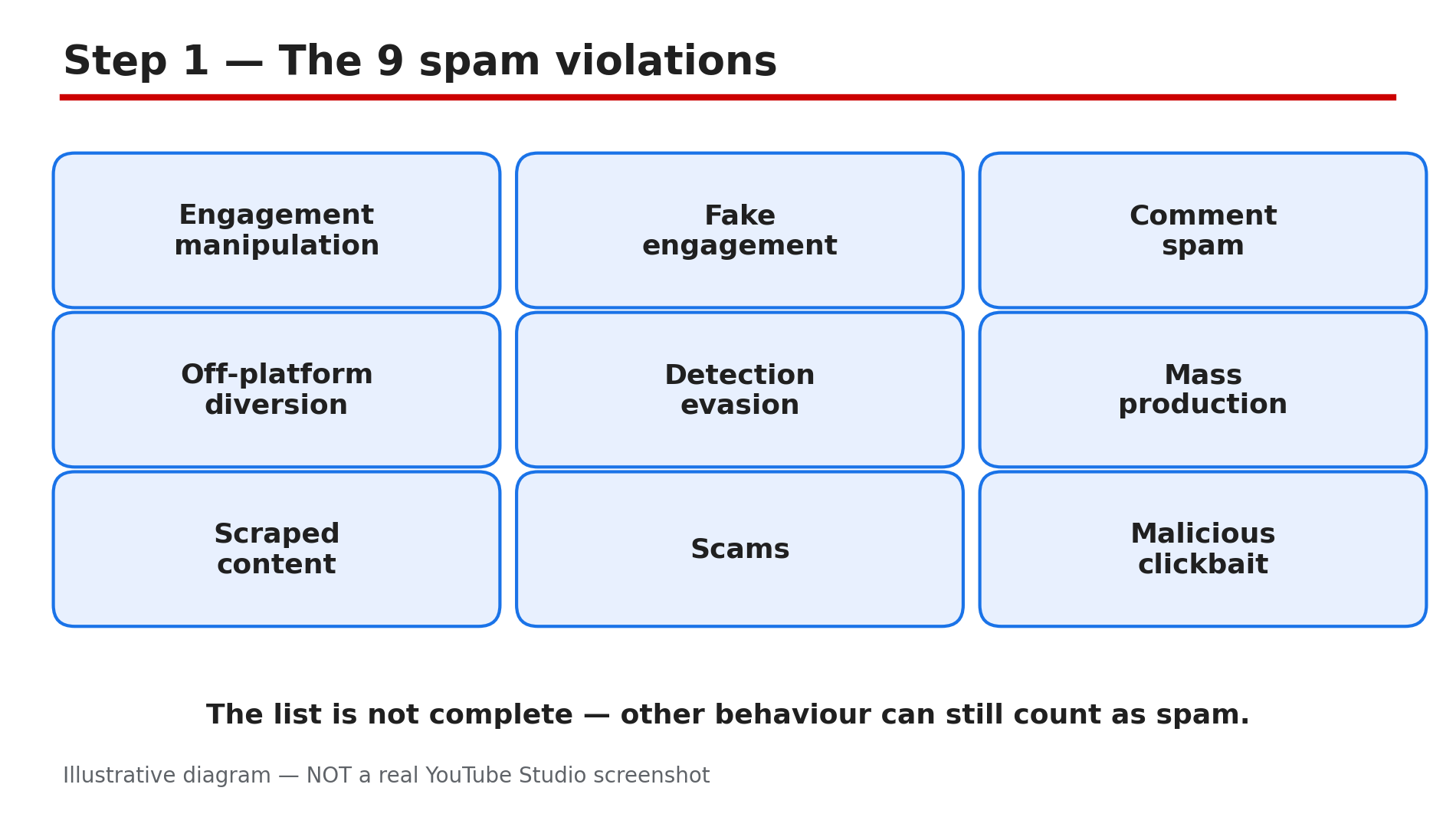
Your channel is gone. One morning Studio shows a termination notice, or a video disappears with a spam warning for "spam, deceptive practices and scams". Spam is not a small rule about comments. It is the policy YouTube uses to remove more channels than any other, and it covers your videos, comments, thumbnails and links — even private or unlisted content. What You Will LearnThe 9 spam violations YouTube lists on its official Spam policy page Why spam is the biggest reason channels get removed What happens step by step: warning, strike, suspension, termination How to audit your own channel for spam risks before YouTube finds them How to clean up risky content safely without making things worse How to appeal a spam termination, and what to writeStep 1 — The 9 spam violations YouTube actually lists What to do: Check your channel against all nine categories on the official Spam policy page. How: YouTube's Help page, "Spam policy", lists nine subcategories. One, engagement manipulation: bots, coercion, or rewards for engagement. Two, fake engagement: exploiting polls or image posts to force engagement. Three, comment spam: high-volume, repetitive or deceptive comments. Four, off-platform diversion: content made only to push viewers to outside sites hosting malware, adult content or illegal goods. Five, detection evasion: speeding up audio, filters or cropping to dodge detection. Six, automated mass production: automated tools or AI churning out high volumes of near-identical content. Seven, scraped content: reposting material without adding your own commentary or editing. Eight, scams: "get rich quick" schemes, fake job offers, or fake support contacts used to steal bank details or passwords. Nine, malicious clickbait: titles or thumbnails that trick people into clicking a video that does not deliver. Example: Fifty near-identical AI-scripted videos a week over the same music is automated mass production — spam even if technically original. Common mistake: Thinking spam means only comment spam — a channel can be terminated for scraped content or misleading thumbnails.Illustrative diagram of the nine spam violations listed on YouTube's Spam policy page. Step 2 — What happens: warning, strike, suspension or termination What to do: Understand the ladder before you are on it, so you know how serious each notice is. How: The Spam policy page says a violation may mean suspended monetisation or a terminated channel. For some violations, YouTube removes the content and issues a warning or a strike. Optional policy training can let the warning expire after 90 days — but break the same policy again inside that window and the warning may not expire; you may get a strike instead. Three strikes within 90 days may terminate the channel. But a single severe-abuse case can terminate a channel with no strikes, as reported in our strike comparison guide. Termination can also reach a network of channels doing the same thing. Example: A creator warned for comment spam takes the training, then runs the same scheme again a month later. The warning does not expire — a strike lands instead. Common mistake: Treating a warning as a free pass — repeating the same breach inside 90 days can turn it into a strike.Illustrative diagram of YouTube's warning and strike ladder for spam violations. Step 3 — Why spam is the biggest reason channels disappear What to do: Take the scale seriously — this is the main way channels are removed. How: Third-party reports citing Google's Transparency Report say that in the second quarter of 2026, spam accounted for 84.5% of the 2,732,395 channels YouTube removed — about 2.31 million channels. Treat that figure as reported, not as an official fact: the official Transparency Report page was not opened live for this article. Even so, spam enforcement is automated, large-scale, and constant. Some reports also describe the page as restructured into its current nine subcategories around June 2026 — a third-party inference, not an official changelog claim. What the official page does confirm is the scope: the policy applies to all content, including unlisted and private content, comments, links, posts and thumbnails. Example: A creator keeps private videos made by scraping other channels' clips, planning to publish them later. Those private videos can still trigger a violation before they ever go public. Common mistake: Assuming unlisted or private content is safe. YouTube's own page says the policy applies to it.Illustrative diagram of the reported share of channel removals caused by spam. Step 4 — Audit your channel for spam risks before YouTube does What to do: Run a one-hour audit of your channel, your comments, and your thumbnails, and write down everything that matches Step 1. How: List any video that is a near-copy of another video with no added commentary, education or editing. Flag any video whose title or thumbnail promises something the video does not deliver. Check comments, live chats, Community posts and polls for the same promotional message or several low-effort polls a day — the fake-engagement example on the policy page. Check descriptions and links: do any videos exist only to push viewers to an outside site promising free money? Finally, check for detection-evasion tricks — mirrored, sped-up or filtered re-uploads. Anything here is a risk even with no notice yet — spam enforcement is largely automated and can act on old content. Example: Three old videos of re-uploaded TV clips with sped-up audio are a detection-evasion risk — delete them now, not after a strike. Common mistake: Auditing only your newest videos — strikes can come from content uploaded months ago, so check the whole channel, including unlisted and private videos.Illustrative diagram of the places on a channel where spam violations can hide. Step 5 — Clean up safely without making things worse What to do: Remove or fix the risky content, stop the behaviour, and keep a record of what you changed. How: Delete videos that are scraped, mass-produced, or built only to divert viewers off YouTube. Stop any sub-for-sub scheme, comment campaign, or poll spam immediately. Fix misleading titles and thumbnails on videos worth keeping. Remove links to outside sites promising free money or downloads you cannot verify. But do not delete a video to dodge a strike already issued: deleting it does not remove the strike, and it can cost you the appeal. If a strike or warning has already arrived, leave that video alone and use the appeal or training route instead. Write down what you removed and when. Example: A creator deletes eight scraped videos, rewrites four misleading titles, and removes a "free payout" link from two descriptions — then writes the list down with dates. Common mistake: Deleting the video a strike was issued on, thinking the strike goes with it. It does not — and the deletion can weaken your appeal.Illustrative diagram of safe clean-up steps and the mistakes to avoid after a spam warning. Step 6 — Appeal a spam termination the right way What to do: If your channel was terminated for spam, appeal through YouTube Studio — our hacked and terminated guide has the full process. How: As reported, you can appeal a termination in YouTube Studio, and you generally have up to one year to do it — confirm the exact window in Studio when you appeal. The appeal is short, so make every sentence count: say which policy you were accused of breaking, explain what happened, and show what you have changed. If the termination came from mass-produced or scraped content, say what you deleted and how future uploads will differ. If the termination was a mistake — your content was original commentary, not scraping — say so plainly and point to the videos that prove it. Do not file multiple appeals, and do not create a new channel to get around a termination. Example: A creator terminated for comment spam appeals in three sentences: the scheme is stopped, the accounts used are listed, and the future comments policy is stated. Common mistake: Writing a long emotional appeal with no facts. One clear, factual appeal beats five angry ones.Illustrative diagram of how to structure a spam termination appeal. Checklist — Before You Upload Anything That Could Look Like Spam☐ No video is a near-copy without my own commentary or editing ☐ No title or thumbnail promises something the video does not deliver ☐ I am not running any sub-for-sub scheme ☐ I am not posting the same promotional comment across many videos ☐ My polls and Community posts are genuine, not high-volume low-effort bait ☐ No video exists only to push viewers to an outside site ☐ No re-upload is mirrored, sped up or filtered to dodge detection ☐ I have checked my private and unlisted videos too ☐ If warned, I took the policy training and did not repeat the breachFAQs 1. Can YouTube terminate my channel for spam without any strikes? Yes — as reported, a single severe-abuse case can lead to termination with no strikes. The normal route is warning, strikes, then termination after three strikes in 90 days. 2. Does the spam policy apply to private and unlisted videos? Yes — the Spam policy page says it applies to all content, including unlisted and private content, comments, links, posts and thumbnails. 3. Is asking viewers to like and subscribe spam? No — asking viewers to like, comment or subscribe is fine. It becomes manipulation with bots, coercion, rewards, or sub-for-sub schemes. 4. How long do I have to appeal a spam termination? As reported, within one year, in YouTube Studio. Confirm the exact window in Studio when you appeal. 5. If I delete the spammy videos, will the strike go away? No — deleting the video does not remove a strike, and it can weaken your appeal. Remove risky content before a strike arrives; after one, use the appeal or training route. SourcesYouTube Help — "Spam policy" (official page, opened live 5 Nov 2026): https://support.google.com/youtube/answer/2801973?hl=en-GB CreatorPlaybook — "YouTube Channel Hacked or Terminated: How to Recover and Appeal": </blog/youtube-channel-hacked-or-terminated> CreatorPlaybook — "Community Guidelines Strike vs Copyright Strike: The Difference and How to Appeal Each": </blog/community-guidelines-strike-vs>