Showing Posts From
Subscribers
 CreatorPlaybook Team
- 08 Nov, 2026
YouTube Shorts Getting Views but No Subscribers? Why and How to Fix It
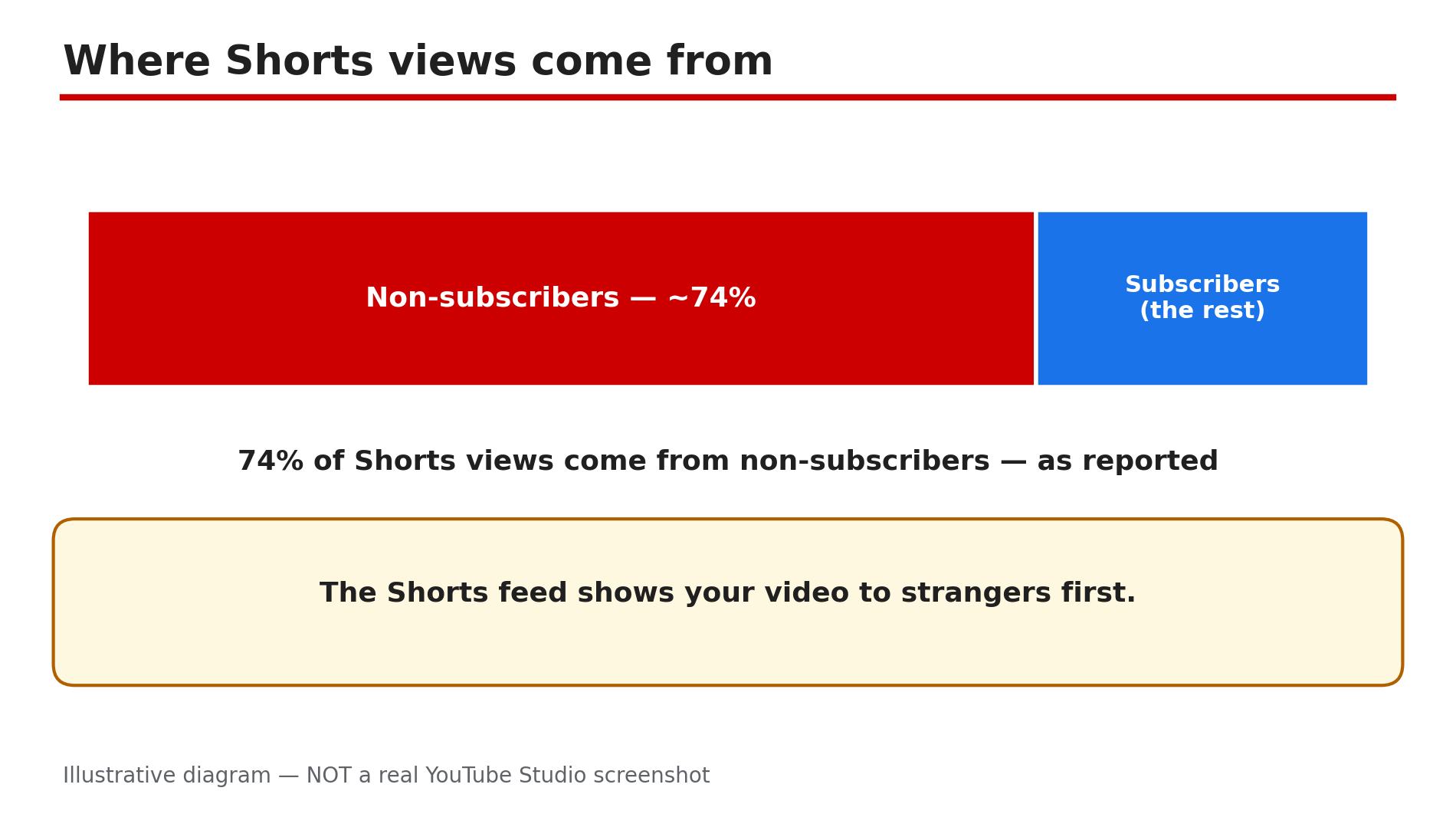
Your Short gets 10,000 views, 50,000 views, maybe even a million — and your subscriber count barely moves. It feels broken. It is not. In most cases, views without subscribers is not a glitch. It is how Shorts are designed to work. Shorts and long-form videos run on separate recommendation systems, and the Shorts feed shows your video to strangers. As reported in a Loopex Digital Q1 2026 report, around 74% of Shorts views come from non-subscribers. The feed rewards a fast swipe — completion, likes, comments, shares, and the newer Save rate added in July 2026 — and none of those is tied to subscribing. At around 16 seconds of average watch time, as reported, that is rarely enough for a stranger to decide to follow you. The fix is not "get more views". It is to give each viewer a reason to come back — here are six fixes that do that. What You Will LearnWhy Shorts views rarely become subscribers What the reported numbers mean How to add a subscribe trigger to every Short How a series earns the next subscribe How your channel page backs the promise How to bridge viewers to long-form videoStep 1 — Read your numbers before fixing anything What to do: Check in YouTube Studio where your Shorts views come from and how many subscribers they produce, so you fix the real gap. How: In Studio, open a Short's Reach tab under Analytics. Most views will show under the Shorts feed — strangers swiping past, not subscribers. Then check the Subscribers report for the same video. As reported by industry analyses, the platform average is around 16.9 new subscribers per 10,000 Shorts views, roughly 1.7%, while strong channels report 2–3%. Treat those as reported ranges, not YouTube's own figures — confirm your own numbers in Studio. Example: A cooking creator's Short has 80,000 views and 90 new subscribers; Studio shows 78% came from the Shorts feed. Nothing is broken — the audience was almost entirely strangers. Common mistake: Judging a Short by views alone. Views measure reach; subscribers measure a decision, and the two need different fixes.Illustrative diagram: most Shorts views come from non-subscribers, so low conversion is the default, not a glitch. Step 2 — Give every Short one reason to subscribe What to do: Attach a specific subscribe trigger to the Short just watched — a promise about what comes next. How: Before you record, finish this sentence: "If you liked this Short, subscribe because tomorrow I will show you ___." Put that promise in the last two or three seconds — not as a generic "please subscribe". The trigger must match the Short: a leaking-tap Short earns "one home fix every day", not "more videos". A specific next video gives them a reason to come back. Example: A fitness creator ends a home workout Short with "Part 2 — the version for bad knees — is tomorrow. Subscribe so you don't miss it." Viewers who want Part 2 now have a concrete reason to subscribe. Common mistake: Saying "like and subscribe" in every Short. Viewers swipe past a generic ask; they act on a specific next step.Illustrative diagram: average Shorts watch time is too short for a stranger to decide to subscribe. Step 3 — Build a series viewers can recognise What to do: Turn one-off Shorts into a series with the same format, opening line, and rhythm, so viewers subscribe for the next episode. How: Pick one format you can repeat at least ten times — "One mistake a day", "60-second fix" — and keep the opening three seconds identical: same phrase, same framing, same on-screen episode number. Publish on a predictable rhythm. A series turns a single view into an expectation, and subscribing becomes the way to keep it. Example: A creator posts "One Excel trick a day" every morning, always opening with "Excel trick number 12". By episode 15, viewers subscribe because they know what tomorrow's trick will be. Common mistake: Posting a different topic and format every day. Each Short then starts from zero, and no viewer ever learns what your channel is for.Illustrative diagram: a specific subscribe promise tied to the Short converts better than a generic ask. Step 4 — Make your channel page back the promise What to do: Make your channel page prove, in five seconds, that subscribing is worth it. How: Open your channel page as a stranger would. Your banner, profile picture, and About section should say the same thing your Shorts promise: who the channel is for and what they get. Group your Shorts into playlists by series, so a visitor who liked one Short sees ten more like it. If the page looks like a different channel from the Short that brought them there, fix the page first. Example: A travel creator's Short about cheap train tickets goes viral, but her channel page shows random vlogs and gaming clips. After she groups her travel Shorts into a "Cheap travel" section and rewrites her banner, the same kind of Short starts converting. Common mistake: Ignoring the channel page. The subscribe button lives there, so the page has to sell it.Illustrative diagram: a repeatable series with the same opening makes subscribing the way to keep watching. Step 5 — Bridge Shorts viewers to a long-form video What to do: Use each Short as a doorway to a longer video on the same topic. How: For each Short, pick one related long-form video, link it in a pinned comment, and mention it: "The full 10-minute version is linked in the pinned comment." As reported by one guide, this bridge can lift watch time by around 20% — present that as reported, and confirm in Studio whether your own pinned-comment links get clicked. A viewer who watches eight minutes of your long video has learned enough to decide it is worth following; a sixteen-second swiper has not. Example: A gardening creator's 40-second Short shows a tomato trick and pins: "Full video — how I grew 40 kg of tomatoes on a balcony — linked below." Viewers who click watch the long video, and some subscribe from its end screen. Common mistake: Linking a random popular video, or hiding the link in the description where Shorts viewers never look.Illustrative mock-up: the channel page must match the Short that brought the visitor there. Step 6 — Test, measure, and repeat what converts What to do: Compare your Shorts by subscribers per 1,000 views, keep the formats that convert, and drop the ones that only collect empty views. How: In Studio, divide subscribers gained by views for each recent Short. Note which formats and triggers sit at the top. Also watch the Save rate, added as a feed signal in July 2026, as reported: a saved Short is one people return to. Change one thing at a time; give each change five Shorts before judging it. One viral Short tells you nothing; a pattern across ten tells you everything. Example: A creator finds her "mistake to avoid" Shorts gain three subscribers per 1,000 views while her trending-audio Shorts gain almost none. She doubles the mistake format, and her subscriber growth rises even as total views fall. Common mistake: Chasing the next viral Short instead of repeating the format that converts. More views of the wrong kind will not fix a conversion problem.Illustrative diagram: a pinned comment bridges a Short to a related long-form video that earns the subscribe. Checklist — Turn Shorts views into subscribers☐ Checked Studio: feed share and subscribers per Short ☐ Compared my rate with the reported range ☐ One specific subscribe trigger in every Short ☐ A repeatable series with the same opening and rhythm ☐ Channel page matches the Shorts' promise, series grouped ☐ Pinned comment links a related long-form video ☐ Measured subscribers per 1,000 views ☐ Kept the converting format, dropped the restFAQs 1. Is it normal for Shorts to get views but almost no subscribers? Yes. As reported, around 74% of Shorts views come from non-subscribers, and the reported average is about 16.9 new subscribers per 10,000 views. Low conversion is the default — Steps 2 to 5 are how you beat it. 2. How long before these fixes show results? Give it two to three weeks and ten or more Shorts. One Short proves nothing — check whether subscribers per 1,000 views are rising across the batch. 3. Should I ask viewers to subscribe in every Short? Yes, but only with a specific promise tied to that Short — the next episode, the full version, the next tip. A generic ask trains viewers to ignore it; a specific reason gives them something to act on. 4. Will one viral Short fix my subscriber problem? No. A viral Short brings strangers who watched for a few seconds and will never return. Steady conversion comes from a series, a clear channel page, and a bridge to long-form video — not one lucky video. 5. How is this different from a channel that is not growing at all? This guide is about Shorts that get views but no subscribers. If your whole channel is stuck with low views, the diagnosis is different — see our guide linked in Sources. SourcesYouTube Help — "Create YouTube Shorts" (official page, opened live 8 Nov 2026): https://support.google.com/youtube/answer/10343433?hl=en CreatorPlaybook — "YouTube Channel Not Growing? Diagnose the 4 Real Reasons" (internal link, live-verified published post): </blog/youtube-channel-not-growing-diagnose-4> CreatorPlaybook — "Shorts vs Long-Form Earning: How Many Views to Earn?" (internal link, live-verified published post): </blog/shorts-vs-long-form-earning-how-many>
- CreatorPlaybook Team
- 03 Nov, 2026
Subscribers Not Getting Notifications on YouTube? Bell Settings and the 2026 Push Change
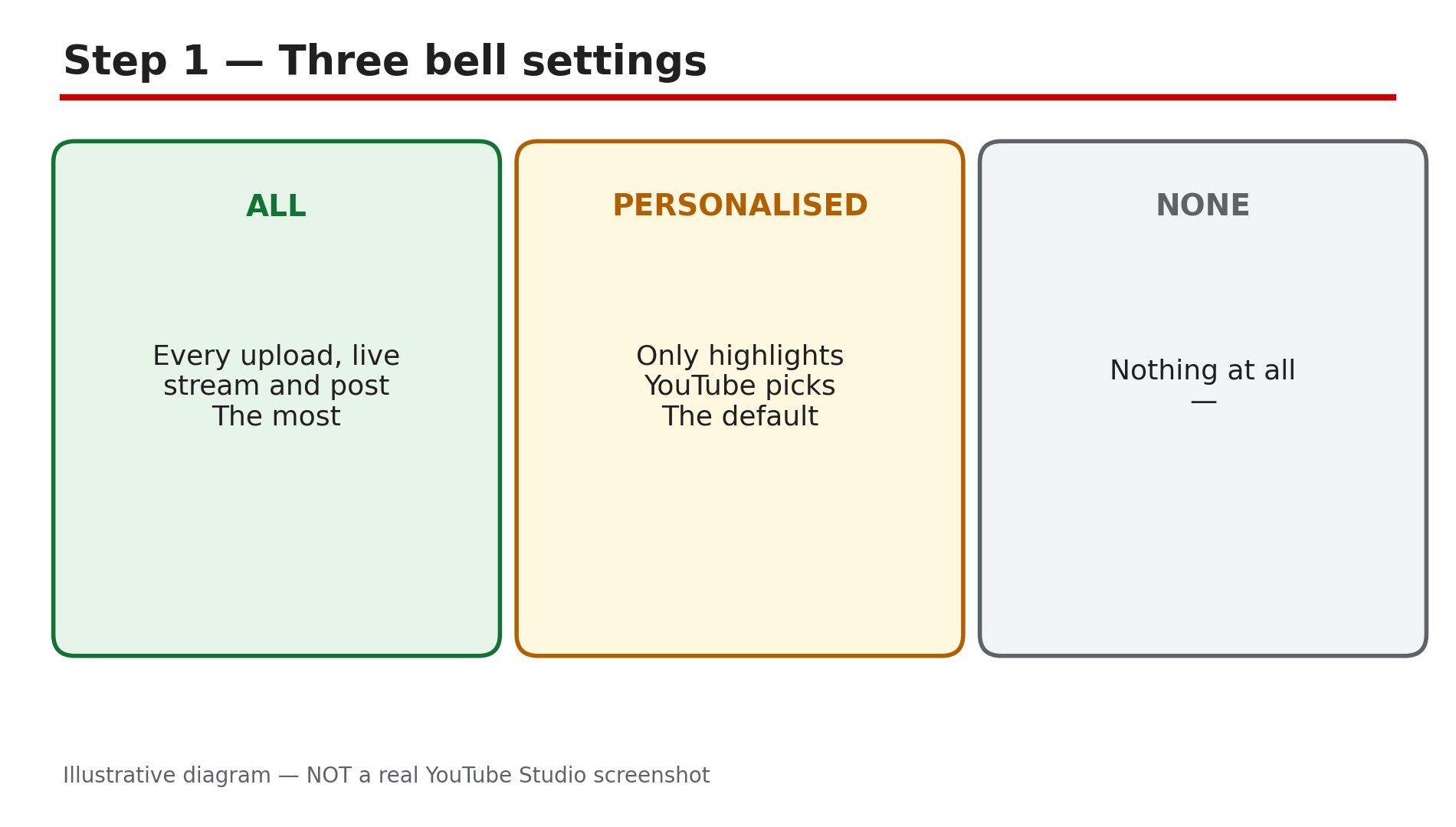
You upload a video, and a subscriber comments: "I never got a notification." Then another one says the same thing. Your views are fine, your subscribers are growing, but the bell — the thing that is supposed to tell people you uploaded — seems to be doing nothing. There are three different reasons subscribers miss a notification. The first is the bell setting itself: most subscribers never change it from Personalised. The second is a change YouTube made in April 2026: it permanently stopped sending push notifications to inactive subscribers who had chosen "All". The third is a set of limits on the creator's side — including a cap of three video notifications in 24 hours. What You Will LearnThe three bell settings, and which one your subscribers actually have The April 2026 push-notification change, and who it affects The creator-side limits that stop notifications being sent at all The viewer-side checks, in order What "Bell notifications sent" in Studio actually tells you What to tell a subscriber who says they never get notifiedStep 1 — Understand the three bell settings What to do: Learn what All, Personalised and None actually do, because most of the problem lives here. How: When someone subscribes to a channel, YouTube automatically gives them personalised notifications — highlights the system picks for them, not every upload. YouTube's Help page says you can change from Personalised to All to receive more notifications, or choose None. All means a notification for every upload, live stream and community post. Personalised means YouTube decides which uploads are worth interrupting them for. None means nothing. Example: A creator asks their audience to check the bell. Dozens reply it was on Personalised — they had subscribed years ago and never touched it. Common mistake: Telling subscribers to "turn on the bell" without saying which setting. The bell is already on for most of them — on Personalised.Illustrative diagram of the three YouTube notification bell settings. Step 2 — Learn the April 2026 push-notification change What to do: Understand YouTube's 2026 change, because it explains the subscribers who did everything right and still get nothing on their phone. How: In April 2026, TeamYouTube announced on the official YouTube Community forum that YouTube had permanently stopped sending push notifications to inactive "All" subscribers — subscribers who meet all three conditions: they have not watched the channel anywhere on YouTube for about a month, they received one or more notifications recently but did not engage with any of them, and they opted into "All" notifications. Those subscribers still get notifications in the app's Inbox — but no push alert on their phone. Example: A subscriber chose All in 2024, stopped watching in early 2026, and now gets no push alerts — even though the bell still shows All. They open the app and find three unread notifications in their Inbox. Common mistake: Treating this as a bug. It is a deliberate change, and the fix is on the viewer's side: watch the channel again, and the push alerts come back. Do not repeat the third-party claim that the bell "only reaches 30%" of subscribers — that figure comes from a push-notification vendor's marketing, not from YouTube.Illustrative diagram of the three conditions behind YouTube's April 2026 push-notification change. Step 3 — Check the creator-side limits that swallow notifications What to do: Check your own publishing behaviour, because several notification failures start with the creator, not the subscriber. How: YouTube limits how many video notifications go out. As reported in YouTube's own community guidance, a channel gets a maximum of three video notifications in 24 hours — publish a fourth video in the same day and its notification is not sent. Other creator-side causes: changing a video's privacy setting before its notifications were sent, choosing to skip notifications for a video at upload, and setting the audience to Made for Kids — YouTube's Help page is explicit that you will not get notifications if a channel's content is set as Made for Kids, and the bell is locked to no notifications. Example: A creator publishes four Shorts and a long video on the same day. The fifth upload gets no notification — the daily limit was already used. Common mistake: Publishing five videos in one day and blaming the bell. Space uploads out, and check the audience setting before you blame your subscribers.Illustrative diagram of the three-video notification limit in 24 hours. Step 4 — Walk a subscriber through the viewer-side checks What to do: Give a subscriber a short ordered checklist, starting with the account and ending with the device. How: First, confirm they are signed in to the right Google account — notifications only arrive on the account that subscribed, and many people have two. Second, open the channel page and tap the bell next to Subscribed, and choose All. Third, check YouTube's own notification settings: profile picture, then Settings, then Notifications, and confirm the types they want are switched on. Fourth, check the phone: the YouTube app must be allowed to send notifications, and the phone must not be on Do Not Disturb. Fifth, check the Inbox: tap the bell icon at the top of the home page — notifications that never arrived as a push may be sitting there unread. Example: A subscriber does all five checks and finds the YouTube app's notifications were switched off in the phone's settings after a system update. One toggle fixes it. Common mistake: Skipping straight to reinstalling the app. Reinstalling is the last step, not the first — and it does not fix a bell set to Personalised or the April 2026 inactivity rule.Illustrative diagram of the five viewer-side notification checks in order. Step 5 — Read "Bell notifications sent" in Studio correctly What to do: Use Studio's notification numbers to check whether the problem is delivery or interest. How: In YouTube Studio, the "Bell notifications sent" figure shows how many notifications YouTube sent for a video. If it is low, the cause is usually on the creator's side — the 3-a-day limit, a privacy change, or a Made for Kids setting — or the audience is largely inactive, which is what the April 2026 change addresses. If it is high but views from notifications are low, the notifications arrived and people ignored them — that is a title and thumbnail problem, not a notification problem. Example: A video shows 8,000 bell notifications sent and 300 views from notifications. The notifications worked — the thumbnail did not. Common mistake: Reading a low notification-views number as proof notifications are broken. Sent and opened are different numbers.Illustrative diagram separating notifications sent from notification views in Studio. Step 6 — Tell your audience what to do, in one message What to do: Put the fix in one short message your subscribers can follow in under a minute. How: Post it as a community post or say it at the end of a video: "If you miss my uploads, tap the bell next to Subscribe and choose All — not Personalised. Then watch one video, because YouTube stops push alerts if you have not watched in about a month. And check your phone's notification settings for the YouTube app." That covers the three causes in three sentences. Do not promise that All guarantees a push for every video — between the 3-a-day limit, the inactivity rule and device settings, no setting can guarantee that. Example: A creator pins that message as a community post. Over the next month, their notification-driven views rise. Common mistake: Blaming YouTube in public and telling subscribers the platform is broken. It makes viewers distrust the bell instead of fixing it — and the fix is three taps.Illustrative diagram of the one short message to send subscribers about notifications. Checklist — Before You Publish☐ I know the difference between All, Personalised and None ☐ I checked whether the April 2026 inactivity rule applies ☐ I publish no more than three videos with notifications in 24 hours ☐ I do not change privacy settings before notifications go out ☐ My videos are not set to Made for Kids ☐ I can walk a subscriber through bell, account, app settings and Inbox ☐ I read "Bell notifications sent" separately from notification views ☐ I told my audience the fix in one short messageFAQs 1. Why am I not getting notifications from a channel I subscribed to? Usually one of three things: the bell is on Personalised, not All; you have not watched the channel in about a month, so YouTube stopped push alerts; or the YouTube app's notifications are off in your phone's settings. 2. What is the difference between All and Personalised notifications? All sends a notification for every upload, live stream and community post. Personalised sends only highlights YouTube picks for you. 3. Did YouTube stop sending push notifications in 2026? For one group, yes. TeamYouTube announced in April 2026 that push notifications permanently stopped for inactive "All" subscribers — people who had not watched the channel anywhere for about a month and had not engaged with recent notifications. 4. How many video notifications can a channel send per day? As reported in YouTube's community guidance, a maximum of three video notifications in 24 hours. Publish more than three videos in a short period and later ones may not send a notification at all. 5. Why is the bell locked on a channel I like? YouTube's Help page says you will not get notifications if a channel's content is set as Made for Kids — the bell is set to no notifications and cannot be changed. There is no setting on your side that overrides it. SourcesYouTube Help — "Manage YouTube notifications" (official page, opened live 3 Nov 2026): https://support.google.com/youtube/answer/3382248?hl=en-NP&co=GENIE.Platform%3DDesktop CreatorPlaybook — "YouTube Subscribers Dropping or Stuck? Why Counts Fall": </blog/youtube-subscribers-dropping-or-stuck> CreatorPlaybook — "Made for Kids on YouTube: Revenue Limits and How to Fix a Wrong Audience Setting": </blog/made-for-kids-on-youtube-revenue-limits>